Android devices do not have pre-installed remote control software. This requires that you as a user take a number of steps to install the Team Viewer Quick Support program.
The easiest way is to go to our website. At the top is the menu option "Remote Support" which takes you to a page on Google for installing Team Viewer Quick Support. There you select "Install".
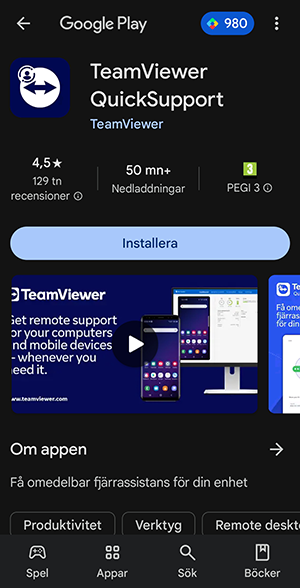
Once you have done this, you will be asked a number of questions about permissions. Answer yes to all of these. Finally, you will arrive at a page that shows a session ID. Leave that number to our support staff and we will be able to find your device. You will then be asked to allow us to connect. You also need to say yes to this.
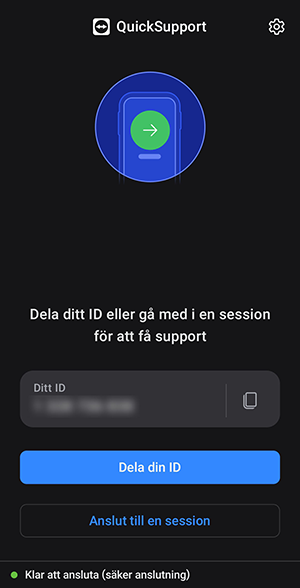
After that, we can normally remotely control your phone in the same way as we remotely control a computer. This varies slightly depending on which mobile phone you have, but for the most common manufacturers, remote control works fully.
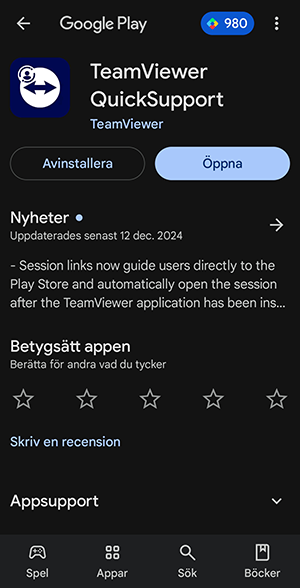
If you keep the program installed after the support case, you can either start it directly from the phone or go through our website again, but instead of showing the Install option, Google Play will show the Open option.
Was this article helpful?
That’s Great!
Thank you for your feedback
Sorry! We couldn't be helpful
Thank you for your feedback
Feedback sent
We appreciate your effort and will try to fix the article